

Add documents from a form
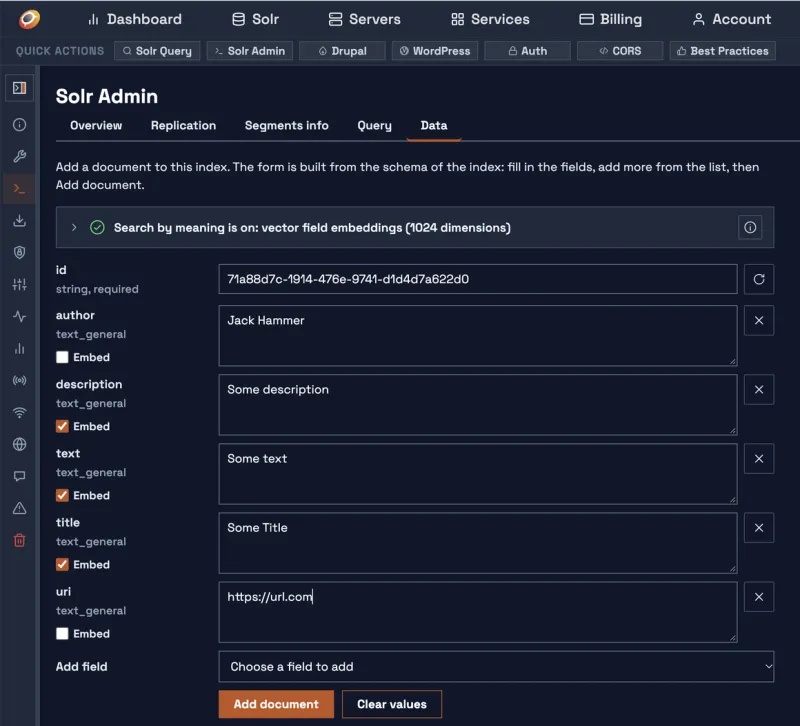
The Data tab of Solr Admin adds documents to your index from a form: no code, no API call, no crawl. The form is built from the fields your index has, so it works on an empty index too.
01 · Where it is
Open the control panel of the index, click Solr Admin, then the Data tab. More about the other tabs: Solr Admin.
02 · The form
- The first field is the unique id of the document, already filled with a new one. The round arrow next to it makes another.
- Then come the fields your index requires, and its main text fields, such as title, description and text.
- Under each name you see the type of the field, and whether it is required or takes several values.
- Text fields get a large box; numbers, dates and true or false fields get the matching input.
03 · More fields
- Add field lists every other field of your index.
- Under Dynamic fields (you name them) are field patterns, such as
meta_*: pick one and type the full name, for examplemeta_color. - A field that takes several values has an Add value button.
- The × button next to a field takes it out of the form.
04 · Add the document
- Fill in the fields you need. Empty fields are not sent.
- Click Add document.
- The document is in the index right away, and the tab shows it as your index returns it.
If a document with the same id is already in the index, the tab asks before going on: adding replaces that document completely. Clear values empties the form; Add another document starts a new one with a new id.
05 · What is checked
- Every value must fit its field: whole numbers, numbers, dates, true or false.
- Required fields need a value, and a field that takes one value takes only one.
- When something does not fit, the tab says which field and why, and nothing is added.
06 · Search by meaning
The box above the form tells you whether your index can search by meaning. When it can, every text field has an Embed checkbox. Search by meaning: Embed.
07 · Many documents
The Data tab adds one document at a time. To send many at once, use Data Ingestion, or let Opensolr read your site with site crawling.