

Put the Chat on Your Site
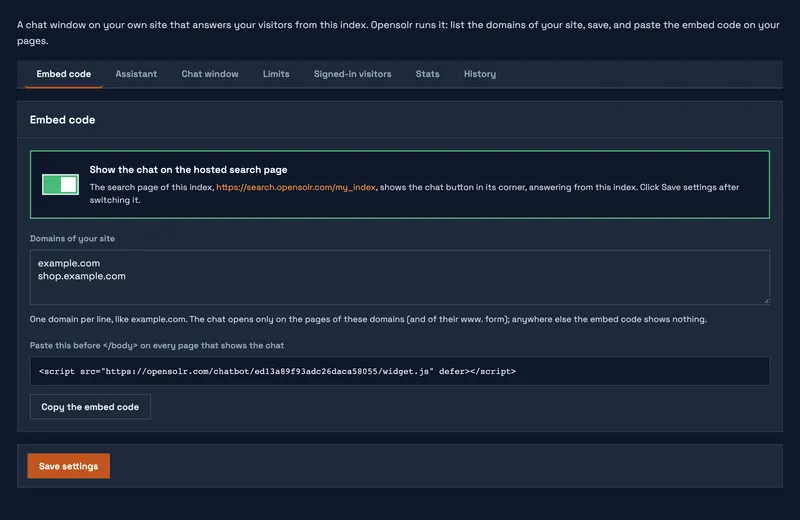
- On the Embed code tab, write the domain of your site under Domains of your site, one per line, like
example.com. - Click Save settings.
- Copy the line shown under Paste this before </body> (or click Copy the embed code) and paste it before
</body>on every page that should show the chat. It looks like this:
<script src="https://opensolr.com/chatbot/YOUR_CHAT_ID/widget.js" defer></script>The chat opens only on the pages of the domains you listed, and of their www. form. Anywhere else the same line shows nothing and the chat answers nothing, so a copy of your embed code on another site does not use your plan. Until you list a domain (or switch on the hosted search page), the chat opens nowhere, and the tab tells you so.
You add and remove domains yourself, any time: there is nothing to ask Opensolr for.
If your site sends a Content-Security-Policy
The Embed code tab also shows the sources to add to your policy, with a Copy the sources button. Add them to the matching directives, next to what is already there:
script-src https://opensolr.com; connect-src https://opensolr.com; img-src https://opensolr.com https:;https: in img-src lets the chat show the photos of the products it answers with, from their pages.
Nothing else is needed: the chat needs no inline styles and no frames. Sites without a Content-Security-Policy add nothing.
Chat Bot pages
- Chat Bot overview
- Three ways to have your chat bot
- What the chat bot needs
- Put the chat on your site
- Show it on your search page and site
- Assistant: instructions and time zone
- Chat window: look and words
- Limits
- Signed-in visitors
- Stats
- History
- What your visitors see
- Commands
- What it can look up
- What it uses from your plan