

What Your Visitors See
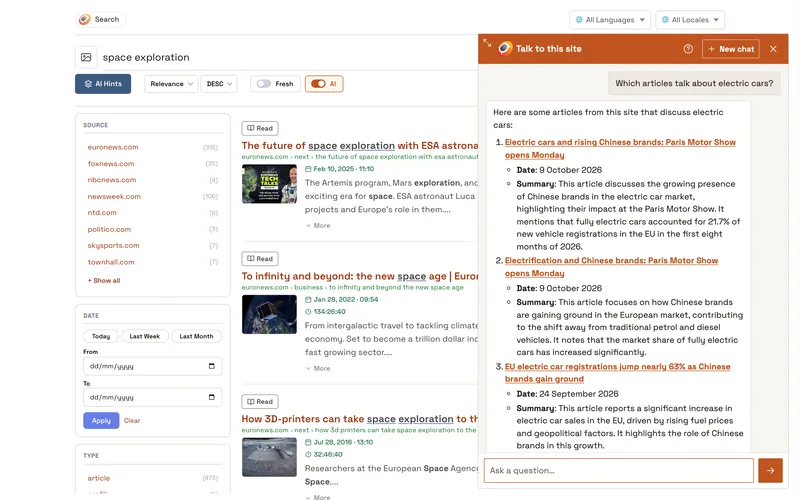
- A chat button in the corner of the page, with your logo and text if you set them.
- A line that shows what the chat is doing, then the answer, written word by word, in the visitor's language, with every source linked. Links open in a new tab.
- The sources at the end of an answer as small pills, one per line, under a thin line. A long title is cut short and shown whole when the mouse is over it; a click opens the page in a new tab. When an answer links none of the pages it used, Opensolr adds them at the end.
- New chat in the header starts over; until then the conversation stays when the page reloads, and follow-up questions keep its context, with what its searches found: sort them by price or go back to the first list is answered from those results, without a new search.
- Good and bad buttons under each answer.
- The chat window can be resized from its top left corner.
Commands
Answered at once: /search, /time, /rate, /vat, /vatcheck, /distance, /place, /postal, /ip, /language, /translate and /help. The question mark in the header lists them, each with an example to click; typing / in the message box lists them too. Each command explained: Commands. What the chat searches and looks up by itself: what the chat bot can look up.
Chat Bot pages
- Chat Bot overview
- Three ways to have your chat bot
- What the chat bot needs
- Put the chat on your site
- Show it on your search page and site
- Assistant: instructions and time zone
- Chat window: look and words
- Limits
- Signed-in visitors
- Stats
- History
- What your visitors see
- Commands
- What it can look up
- What it uses from your plan