

Search Operators
Visitors can refine any search with the operators they know from other search boxes: "quotes" for a phrase, + for a word every result must have, - for a word no result may have. They work with AI on and with AI off.
| Type | What it does | Example |
|---|---|---|
"word1 word2" | Phrase: those words together, in that order | "machine learning" |
+word | Required: every result contains it | +laptop 15 inch gaming |
+"word1 word2" | Required phrase | +"13 inch" |
-word | Excluded: no result contains it | laptop -refurbished |
-"word1 word2" | Excluded phrase | -"open box" |
They combine freely in one search. On the hosted search page, the ? button next to Search opens the same list for visitors.
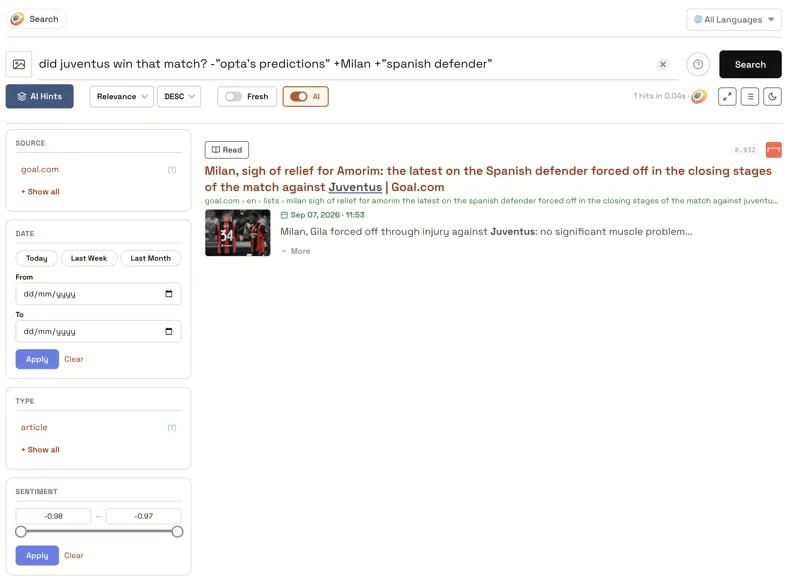
They hold in a hybrid search too
A hybrid search matches the words and the meaning. The meaning side cannot read a minus sign: left alone, it would even move toward the word the visitor wanted out.
So Opensolr takes every + and - word out of the search and applies it as a filter on the whole result list. A result found by meaning cannot bring back an excluded word, and the excluded word never reaches the meaning side.
Good to know
- A phrase on its own, with no + in front, helps the order but does not filter while AI is on, so a page that says the same thing in other words can still come up. Write
+"machine learning"to require the exact phrase, or turn AI off. - Hyphenated words are safe. + and - count only at the start of a word, so
e-mail,covid-19and1+1are searched as they are. A - inside quotes belongs to the phrase.
Where they work
On the hosted search page and the search you embed on your site, in the Drupal module, the WordPress plugin and the five developer packages: LangChain, LlamaIndex, Haystack, Laravel Scout and MCP.