

Your photos never go to Google. And you still find them in a second.
That is why this app exists. Opensolr Photos searches the twenty thousand photos and scanned documents sitting on your phone in plain words, finds the gas receipt by the number printed on it, keeps your people, places and tags in an index of your own instead of in somebody's private database, and clears out the duplicates you have been carrying for years. Open source, on an index that is yours, free, forever!

Free and open source under the MIT license. Android 8.0 or newer. It runs on the free Opensolr account — no card, no expiry, and reading your photos into words is already switched on there. Create one if you do not have it yet.
Six problems. One app.
Opensolr Photos was not written to be another gallery. It was written because Google Photos answered none of these six, and each one is a reason on its own.
1 · The pictures were going to Google
Family, holidays, documents, everything, into someone else's cloud to be read by someone else's models. Here your library never leaves your folders. Nothing is backed up, copied or shared, and there is no Google account anywhere in it.
2 · Twenty thousand photos, no way to find one
Type what you remember — dog on the beach, my passport, a friend's name — and the photo is on screen. It is a real search engine, your own Opensolr Index, not a gallery you scroll until your thumb hurts.
3 · “I need the gas receipt from September 3”
The words printed inside every receipt, invoice and contract are read and indexed. Search the shop, the total or the receipt number, find it, share it from the app. The accountant gets it in about fifteen seconds.
4 · Your metadata, in your own index
Google keeps your people, places and labels in its own database and hands you a JSON file on the way out. Here every name, tag, word and corrected position is saved in an Opensolr Index on your own account: plain Apache Solr, yours to query, export and take anywhere.
5 · The same picture, thirty times
One slider goes from “photos of the same thing” all the way to “the same file, byte for byte”. Tick one of each group with a single tap and delete the rest, so your library stops growing on noise.
6 · Nothing you have to take on trust
Every line is on GitHub under the MIT licence: read exactly what leaves the phone, or build the APK yourself. And it runs on the free Opensolr account, which costs nothing and does not expire.
Your photos go in. Opensolr reads them. You search.
There is nothing to set up on the Opensolr side. The app creates this phone's index the first time you sign in and keeps it in step with the folders you choose. Your photos stay exactly where they are and are never written to; your own words — tags, names, wording — go into your index.
- Sign in with OpensolrThe Opensolr login opens in your phone's browser, with your saved password and two-factor authentication if you use it. The app never sees your password.
- See what your plan coversRight after sign-in the app shows, in plain numbers, how many photos a month your plan can read, how much disk space and search bandwidth your index has, and how many indexes the account holds.
- Pick your foldersDCIM, where your camera saves, is proposed. Add screenshots, WhatsApp images or any other folder you like.
- Let the first sync runYour photos are read and indexed in the background, with a progress notification. New photos show up in search while the rest are still being added.
- SearchType what you remember, filter, and tap a photo to see it full screen, with everything you can do with it under it.
“I need the Chevron receipt from September 3.”
Type chevron. There it is. Share it and go back to work. The same reading that finds the dog on the beach also reads the words printed inside a photo, so the pile of gas receipts, restaurant bills, invoices and contracts in your scanner folder stops being something you scroll through and becomes something you ask a question of.
Point it at the folder where your paperwork lands
Gas receipts, invoices, contracts, warranty slips, a photographed ID, a screenshot of a booking: whatever you scan or photograph, in whichever folder it ends up. The words printed inside are read, so months later you find the one you need without opening a single file.
- By what is written on it. The receipt number, the total, the name of the shop, the street, the date on the invoice.
- Or in plain words. “gas station receipt”, “contract”, “warranty card”: the app reads what the picture is as well as the text on it, so both ways find it.
- Paperwork only. Switch the OCR filter on and everything without text printed on it drops out of the results.
- Your own labels. Tag a whole batch as taxes 2026, or write your own wording on one, and it is saved in your index, where you can search and filter by it.
- Any folder, not just the camera. Your scanner folder, Downloads, WhatsApp images, screenshots: add them and they are indexed the same way.
- Read again, any time. When Opensolr gets better at reading text, Documents sends your paperwork through again and leaves the rest of your photos alone.
- Nothing read is ever lost. If a later pass cannot read a photo again — a plan without vector search, or a month's AI requests already used — the text and the words read out of it before are kept, as long as it is the same file.
Scan the page with the app
Tap Scan in the header, next to Me. Your camera becomes a document scanner.
- It finds the page for you. An outline follows the edges of the page while you aim, on a plain desk as well as on wood, a patterned cloth or a cluttered table.
- Four corners, your call. The photo opens with the corners already on the page. Drag any of them if it is off.
- Straight and sharp. Save flattens the page into a clean rectangle at the full resolution of the camera, then the camera comes back for the next page.
- Searchable the moment it syncs. Each page lands in a folder you already sync, so on a plan with vector search its printed text is read and the receipt is found by its total, the letter by a word in it.
Send it as one PDF
Pick the pages, get a single file you can mail, upload or archive.
- In the order you tick them. Page one of the PDF is the photo you ticked first, page two the second, and so on.
- Any photos, not just scans. Tap PDF in the selection bar on whatever you picked, name the file and choose where to save it.
- Sharp enough for OCR, small enough to send. Each page goes in at up to 300 dpi.
- Your photos stay as they are. The PDF is a new file; nothing in your library is changed. How scanning works
Saved in your own index. Not in a database you do not own.
Name the people, put the right place on the map, add your tags, rewrite what the photo shows — on one photo or on a whole selection at once — and every word is saved in an Opensolr Index on your own account, with a copy on the phone. Google keeps that work in its own database and gives you a JSON file on the way out. Yours is an Apache Solr index: standard, open, and yours to take anywhere.
What is kept
In your index, and in the app's own copy on the phone.
- The people. The names you give to their faces, and the names other apps already wrote into your files (the XMP PersonInImage property Google Photos, Lightroom and digiKam use), read in when the photo is indexed.
- Your tags. Your own labels, kept apart from anything Opensolr reads in the photo, so they are never confused with it.
- The place. Wrong GPS, or none at all? Pick the spot on the map, and the map, the place names and the radius search all use it.
- Your wording. What you say the photo shows, and it always beats what Opensolr read in it.
What that buys you
Metadata in an index that belongs to you behaves differently.
- Portable. It is plain Apache Solr on your account: query it or export every document with any Solr client, or, on a plan with backups, download a backup and run it on any Solr you like.
- New phone, same words. Sign in on a new phone and your people, tags and wording are read back from your index.
- A whole selection at a time. Add puts your words on top of what each photo carries, Replace makes them the whole of that field, and the sheet shows what the ticked photos already carry, with counts.
- The pictures are never touched. The app never writes to a photo file.
Thirty photos of the same thing. Pick one, bin the rest.
You photographed the same cake six times to be sure one came out. Multiply that by ten years. One slider walks from photos of the same people or that merely show the same thing, through the same shot, to the same file byte for byte. Select 1 of each group ticks one photo of every group and leaves the first one untouched, so you can never empty a group by accident. Then share, delete, or send them to be read again.
Loose: the same thing
Photos read into the same words, by the same camera. The cake, the dog, the whiteboard, all in one group. Under one photo, first of all: the photos with the same people in them.
Tight: the same shot
The same moment, matched on the photo's own EXIF — time, camera, lens, exposure, position — so a crop, a rotation or a filter stays in the group with its original.
Exact: the same file
The same bytes, checked on the phone. That is the only real proof of a copy, which is why the app is honest and calls the rest similar photos.
A search engine for your camera roll.
Not a gallery that wants to replace your gallery: Opensolr Photos is the part your gallery is missing. Find the photo, see it full screen, and open it in your gallery with one tap.
A copy of your index, on the phone
The phone keeps a copy of every document its index holds — everything except the search fingerprint and the copy checks. It is read from the index once, when you install or reinstall the app, and every write afterwards keeps it in step. So browsing costs nothing: the years, the months, the days, their counts and the photos in them all come from the phone, with no network. A sync with nothing to do makes no requests at all. Tag and name suggestions, and the list of what your selected photos already carry, are answered on the phone. The filter lists are asked for once and kept until a sync actually writes something.
Search by meaning, not by file name
With a plan that includes vector search, every photo is read into words describing what it shows, so “puppy” also finds the photos read as “dog”, and “seaside holiday” finds the beach. Without vector search on your plan nothing is sent to be read: photos are indexed by date, camera, place, file name and your own words, and search matches those words.
OCR: the words printed in the photo
On a plan with vector search, the words inside a gas receipt, an invoice, a shelf label, a screenshot or a business card are read (OCR) and become searchable, so the receipt comes up by the station, the total or its number. Only photos that actually carry text are read. Switch the OCR filter on and pick receipt to see only your paperwork.
A document scanner, and PDFs from what you pick
Scan finds the edges of the page while you aim, lets you drag the four corners, and saves the page flat and at the camera's full resolution, straight into a folder you sync, where its text is read like any other receipt. Tick pages, or any photos, tap PDF, and you get one file in the order you ticked them, at up to 300 dpi.
The people in your photos
Name a face once and the app finds that person across your library, on the phone: the clear matches get the name on their own, the rest are offered for you to confirm with a tick. Type a name, filter by person, tap them in Stats, or open any photo and see the photos of the same people. Faces are found and compared by your phone alone; the names and fingerprints go only to your own index.
Browse by year, month and day
With nothing typed, your photos are laid out in three levels: year, then month, then day. Today, yesterday and the last few days stay above the years, where you look first. Every month is spelled out by its days, even a month with a single day. Each heading folds away, and the app remembers which ones you left folded. All of it is read from the copy on the phone, so it opens with no network and no requests.
Pick photos with a long press
Press a photo and hold it to start picking; untick the last one and picking ends by itself. A tick on a heading takes the whole group — a year, a month or a day — not only the photos loaded on the screen. In a text search, Best matches and Also similar have no group tick, because the line between them moves as more results arrive.
Filter what you found
Narrow any search by year or any two days, by what the photo shows, by your tags, by person, city or country, camera or orientation, or a distance around a point — and switch on OCR, Tagged, Has people or Has location. Every group of filters folds, folded to start with, stays the way you left it for next time, and carries a count of how many of its own filters are on. Pick a few years and the Taken between calendar narrows to those years and opens there. The filters come from your own photos, so every choice has results behind it.
Your words, saved in your index
Tag one photo or a whole result set at once, and every word goes into your own index — the section above says what and where. Saving is finished on the phone, so you never wait for the network: the sync that starts straight after carries the words up to your index. The same tag or name written two ways is kept once.
See them on a map
Every photo and clip taken with a location becomes a marker on a map, grouped on fixed places with the exact count of each group, so the groups stay put as you move. Tap a group and every photo in it opens straight away, instead of zooming in step by step, in a sheet you can drag up to the whole screen. The map names where you are looking, by city and country, and you can search that area. At night the map is dimmed, so the sea stays blue. The place is written into the index too, so “Lisbon” is a search, a filter and a suggestion.
Type less, find more
As you type, the app offers the words your own photos were read into, the cameras and the places. Your tags and the names of your people come from the copy on the phone, so they appear at once, with no network. Misspell something and it asks Did you mean…? Nothing is guessed from a dictionary; every suggestion is a photo you have.
Swipe through what you found
Tap a result and it fills the screen at its own size. Swipe left and right and you walk the photos you just searched for, in the order they came back — something your gallery cannot do, because it knows nothing about your search. Pinch to magnify, double tap to zoom in on the spot you touched, swipe up for the details, down to put it back where you were. Everything you can do with a photo sits under it: tag, edit, set it as your wallpaper, open it in your gallery, find similar photos, share, see it on the map, find photos nearby, delete.
Erase people, things and text
A stranger in your shot, a bin, a cable, a date stamp: paint over it and tap Erase now, and the spot is filled from what is around it. Find text marks every word in the photo for you; tap a word to keep it, and only the letters are erased, not the sky or the band behind them. It all runs on your phone, with no network and no AI requests. Erasing people and things · Erasing text
Straighten, crop, draw, write
The editor levels a crooked horizon half a degree at a time, with a grid to line it up and a crop box you move and resize anywhere over the turned photo, never with an empty corner. Rotate, resize, draw shapes that straighten themselves and add text, with undo and redo. Save over the original, or as a copy next to it: the copy is dated when you save it, so it is first in your list, and it keeps the people of the original. The photo editor
Make it your wallpaper
Found the one? Wallpaper under the photo puts it on your home screen, your lock screen or both, upright and sized for your screen, without changing the file. Setting a wallpaper
Your whole library, in numbers
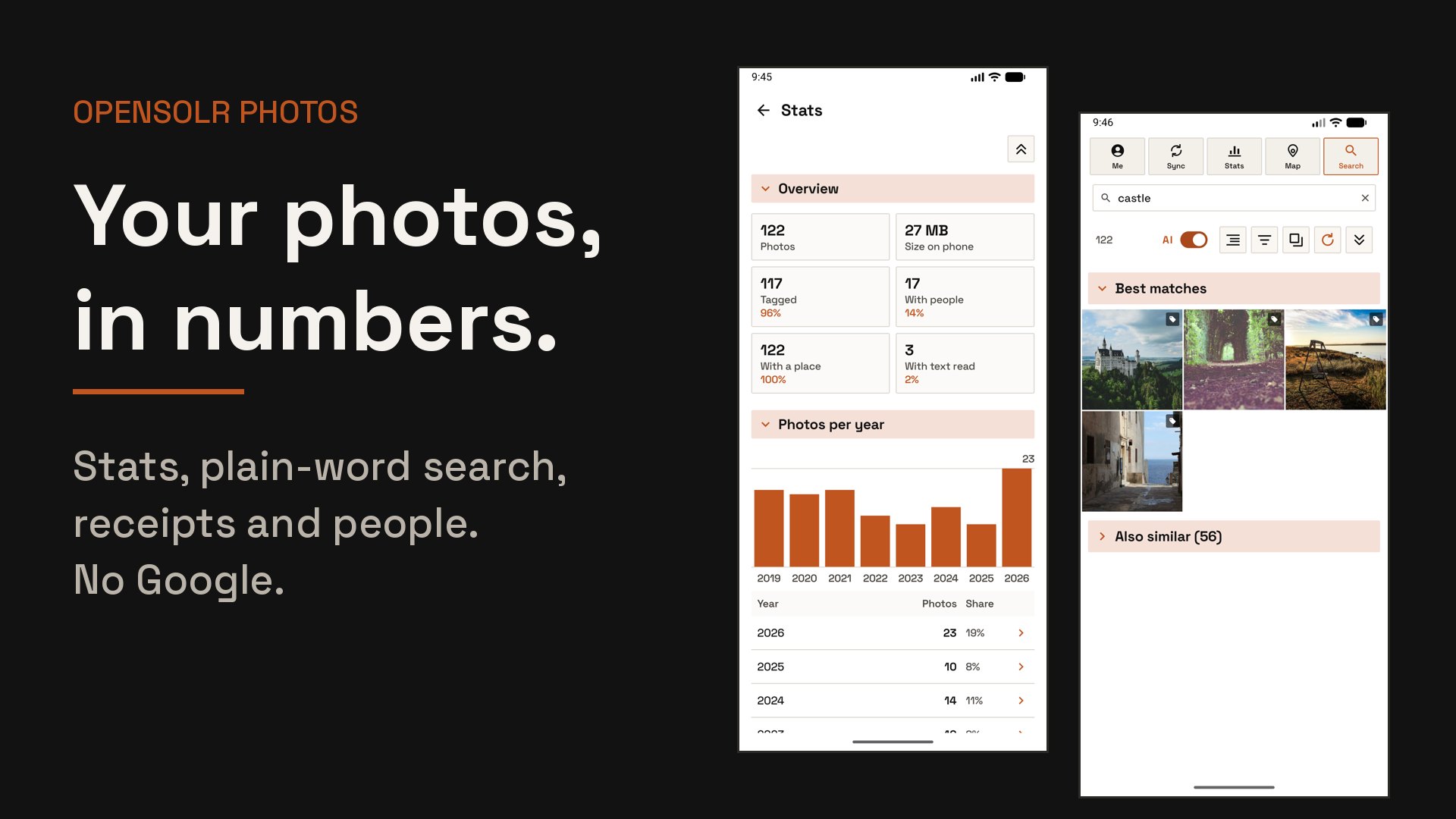
Stats shows your photos per year, per month, per day of the week and even per hour you take them, then the people in them, your own tags, the things in them, the countries, the cities and the cameras — each a chart with its full table under it. It is all counted on your phone, instantly, with nothing sent anywhere. Tap any line and those photos open; go back and you are exactly where you were.
See who is in a photo at a glance
Every thumbnail with people named on it carries a small person mark, next to the tag mark of the photos you tagged. The names and tags live in your index and on the phone, and the filters, the grouping and Stats all read them.
Stays in step on its own
The app notices when your photos change: a minute after you take, edit or delete a picture, a sync runs by itself, even with the app closed. It works out what changed on the phone, comparing your folders with the copy of the index it holds, so a sync with nothing to do asks the index for nothing. Pull the grid down and it reloads and starts a sync too, unless one is already running. A daily, weekly or monthly Re-Sync stands behind it, and when Opensolr gets better at reading photos, Re-read sends them all through again without emptying anything and without losing a single tag.
Search you can tune
One slider on the account screen decides how much meaning and how much your exact words count in a search, the same balance the Opensolr search platform offers. An AI switch next to the results turns meaning off for an exact code or an invoice number.
One index per phone
Every phone gets its own Opensolr Index in your account. Reinstall the app and it finds its index again, pulls its copy of it down once, and only syncs the differences; set up a second phone and it gets an index of its own.
Never silently stuck
If your plan runs out of photos for the month, disk space or bandwidth, the app tells you with a notification that opens your Opensolr account. If the index disappears from your account, a new one is created and filled again automatically.
The originals never leave your phone.
On a plan with vector search, the app sends a small copy of a photo to Opensolr, which describes it in words, reads any text printed on it, and throws the copy away. Without vector search on your plan nothing is sent to be read at all. What is kept, in an index that belongs to your account, is that description, the names and tags and wording you added yourself, and the date, camera and place the photo carries. The phone keeps its own copy of that index, in the app's own storage: words, never pictures.
What the app does not do
On purpose, and you can check it in the source.
- No photo backup. The app is a search engine. Your photos are not copied anywhere.
- No ads, no analytics, no tracking. The app talks to Opensolr, and to OpenStreetMap for the map tiles while the map is open. Nothing else.
- No Google account. Sign-in is your Opensolr account, in your browser.
- No changes to your pictures. The app never writes to a photo file: your tags, the people you name and your wording are kept on the phone and in your index. A photo is deleted only when you select it and confirm.
How your account is protected
The same care as the rest of the platform.
- Browser sign-in, so your password, your password manager and two-factor authentication stay in the browser.
- Encrypted on the phone with a key held by Android's secure key store, and never included in phone backups.
- Encrypted in transit. Every connection is HTTPS; plain HTTP is switched off for the whole app.
- Sign out at any time from the app; your index stays in your account.
A free Opensolr account. That is the whole list.
Free forever, no card, no expiry — and reading your photos into words is already switched on there, so the app works properly from the first minute. A paid plan buys more of the same thing: more photos read a month, more room, more searching. The app shows your real numbers right after you sign in and keeps them on its account screen.
Vector search
Reading a photo into words, the text printed on it, and search by meaning. It is on by default on the free plan. On an older plan without it, photos are still indexed — by date, camera, place, file name and your own tags — and still found by those words.
AI requests per month
One request covers ten photos, so a month's allowance goes a long way. A picture Opensolr has already read never costs anything again, not even after a reinstall.
Disk space
How many photo descriptions the index can hold. Only the descriptions are stored, never the pictures.
Search bandwidth
How much searching the index can serve in a month. Browsing and a sync with nothing to do are answered by the copy on the phone and cost none of it.
Indexes
One per phone you use the app on.
Every line is on GitHub.
Opensolr Photos is MIT licensed. Read how sign-in works, how the index is built and exactly what is sent where, build the APK yourself, or fork it and make it yours. The documentation in the repository explains all of it, with diagrams.
Source code
Kotlin and Jetpack Compose, no closed-source SDKs. github.com/phpcip/opensolr-photos
Documentation
How it works, sign-in, sync, search, filters, stats, duplicates, the map, plan limits, the index schema, privacy, a developer tour of the project, and building from source. Read the documentation
The app ships most weeks, so what is newest lives in the changelog and in the release notes.
Releases
Every version with its signed APK and release notes. All releases
Three steps, about a minute.
- Install itFrom Google Play, or download opensolr-photos.apk, the latest signed release from GitHub, and allow the install when Android asks.
- Open Opensolr Photos and sign inWith your Opensolr account. No account yet? Create one.
- Pick your foldersThe first sync starts on its own. Search as soon as the first photos arrive.
Keep your photos. Keep your privacy. Find anything.
Free, open source, nothing uploaded to Google, your tags and people kept in an index that is yours, every receipt findable and the duplicates gone. On a free Opensolr account that never expires — need more photos a month, room or bandwidth? See the plans.