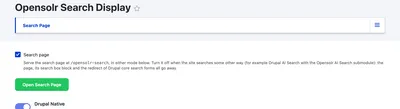
Turn the Search Page On or Off
One checkbox decides whether your site has the Opensolr search page at all. It is on after installation.
Where: Opensolr Search › Search Page tab › Search page checkbox, at the top
When it is ticked
The page at /opensolr-search is served in the mode you pick below it (Drupal Native or Opensolr Embeddable Search UI), and Drupal's own search forms send visitors to it.
When you untick it
- The page
/opensolr-searchgoes away. - So does the Opensolr Search Box block.
- Drupal's core search forms keep their own page again.
Untick it when your site searches some other way, for example with Drupal AI Search on the same Opensolr Index. Your index, its content and the other tabs are not touched.
Click Save configuration at the bottom of the tab. The Open Search Page button, just below the checkbox, opens /opensolr-search in a new tab.