

Search Analytics
See what your visitors search for, what they click, and which searches find nothing: the pages your site is missing. Everything is recorded in your own Drupal database.
Where: Configuration › Search and metadata › Opensolr Search › Analytics tab (
/admin/config/search/opensolr/analytics)Period
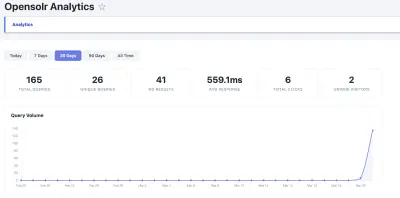
Today, 7 Days, 30 Days (the default), 90 Days or All Time. Everything on the page follows it.
The six numbers
- Total Queries and Unique Queries: searches made, and how many different ones.
- No Results: searches that found nothing.
- Avg Response: how long a search took on average.
- Total Clicks: clicks on results.
- Unique Visitors: different visitors who searched.
The charts and tables
- Query Volume: searches per day.
- Top Queries: the most searched words.
- No-Results Queries: what people wanted and did not find. Write those pages, or pin a better result.
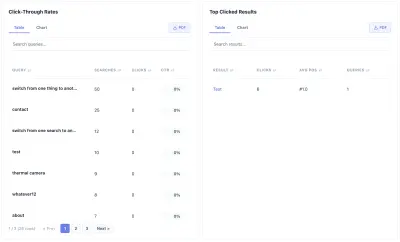
- Click-Through Rates: for each search, how often a result was clicked.
- Top Clicked Results: the pages most opened from search.
Each table has a search box, sorting and pages, a Table / Chart switch, and a PDF button that downloads it as a report.
Privacy
Visitor IP addresses are never stored as they are: they are hashed with your site's own salt first. The analytics stay in your Drupal database; no outside service receives them.
In Embeddable Search UI mode, searches are recorded by Opensolr and shown in your Opensolr account: see Search analytics.