

Instructions, Limits, On and Off
Tell the assistant how to talk, keep each visitor within limits you choose, and switch it off and on whenever you like.
Where: Opensolr Search › Assistant tab › Instructions and limits (click to open)
Instructions
Optional, in your own words: its tone, what to recommend, what to avoid. They are added after its built-in rules, which stay: it searches your site, answers only from what it finds, links every page, product and PDF page it mentions, and looks facts up.
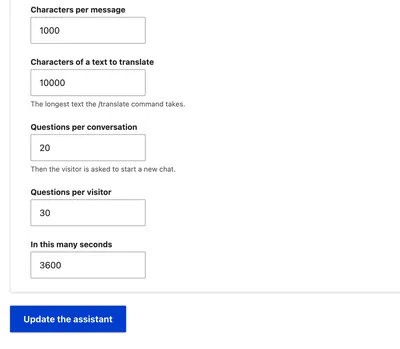
Limits
| Setting | Default | What happens at the limit |
|---|---|---|
| Characters per message | 1,000 | A longer message is refused, with its length shown. |
| Characters of a text to translate | 10,000 | The longest text /translate takes, counted on the text alone. |
| Questions per conversation | 20 | The visitor is asked to start a new chat. Commands do not count. |
| Questions per visitor | 30 | Within the next setting's time window. |
| In this many seconds | 3,600 | The time window of Questions per visitor. |
Click Update the assistant to save. Messages refused by these limits are counted in the Stats.
On or off
At the top of the tab, under On or off:
- Turn the assistant off hides Ask this site on every page, and the assistant answers nobody. Its settings, stats and history are kept.
- Turn the assistant on brings it back everywhere.
Site Assistant
- Site Assistant
- Set Up
- Commands
- Translate
- Instructions and Limits
- Stats
- History
- What It Costs
- AI Tools for Developers