

Embeddable Search
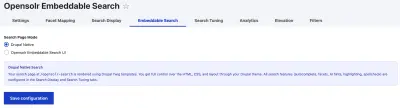
The module offers two completely different ways to display search on your Drupal site. You choose which one to use on the Embeddable Search tab (/admin/config/search/opensolr/embeddable).
Native Search vs. Embeddable Search
Drupal Native
Search is rendered by Drupal using Twig templates that you can override from your theme. Full control over the HTML, CSS, and behavior. Configured via the Search Display and Search Tuning tabs.
Opensolr Embeddable
A pre-built search widget from search.opensolr.com loads as an iframe on your /opensolr-search page. Zero customization needed — it works out of the box with a polished UI.
When to use which
Use Native when:
You want full control over the search page look and feel, need to match your theme exactly, or want to override templates with custom HTML.
Use Embeddable when:
You want instant search with zero effort, don't need template customization, or want the same search UI that Opensolr provides on its own platform.
Switching between modes
Select either "Drupal Native" or "Opensolr Embeddable Search UI" and click Save. The change takes effect immediately on your /opensolr-search page.
Both modes use the same /opensolr-search URL. Visitors don't see any difference in the URL — only the search interface changes.
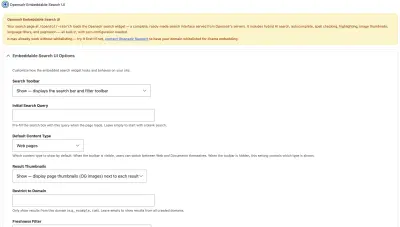
Embeddable options
When you select the Embeddable mode, additional options appear:
- Search Toolbar — Show or hide the search bar and filter toolbar
- Initial Search Query — pre-fill the search box with a default query on page load
- Default Content Type — show web pages or documents first
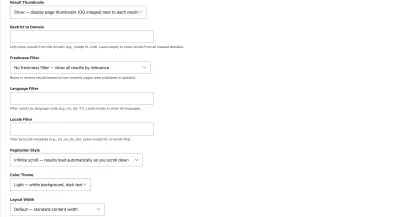
- Result Thumbnails — show or hide OG image thumbnails
- Restrict to Domain — only show results from a specific domain
- Freshness Filter — boost recent content or show all equally
- Language Filter — restrict to a specific language (e.g.,
en) - Locale Filter — restrict to a specific locale (e.g.,
en_us) - Pagination Style — infinite scroll or numbered pages
- Color Theme — light or dark
- Layout Width — default or full width
Elevation in Embeddable mode
When using the Embeddable UI, query elevation is managed directly in your Opensolr dashboard, not from the Drupal admin. The Elevation tab shows a link to the right panel.