AI-Hybrid Search

Find answers to your questions quickly and easily

Testing OpenSolr Vector Search

Testing OpenSolr Vector Search: Step-by-Step Guide

This tutorial will show you how to test and explore your OpenSolr Vector Search Engine with real examples, including API queries, curl commands, and code snippets in PHP, AJAX, and Python.


1. Overview

OpenSolr lets you build a complete AI-powered search pipeline:

Crawl → Index → Embed → Solr → Search

You can create this entire flow out of the box using the OpenSolr Web Crawler Site Search Solution:

👉 AI Opensolr Web Crawler

For setup details, assistance, or pricing information, contact us at:
📧 support@opensolr.com


2. Testing Vector Search Online

Test it first here with these example queries:

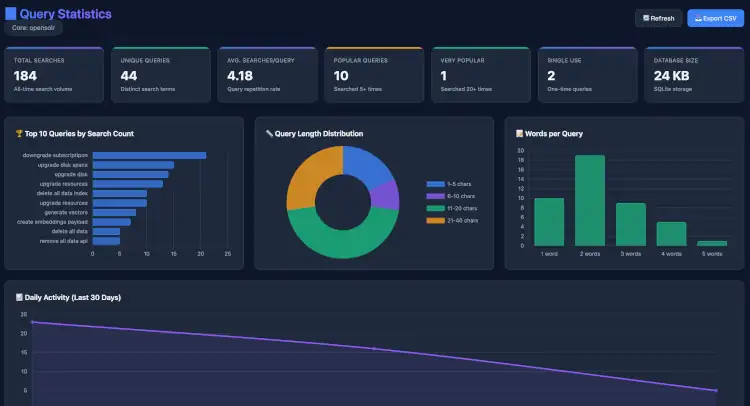
This will also match a concept rather than a semantic query, and in every one of these examples, or in any of our Demo Search Pages, you also get dev tools, and comprehensive stats.

Query Paramters Inspector & DebugQuery
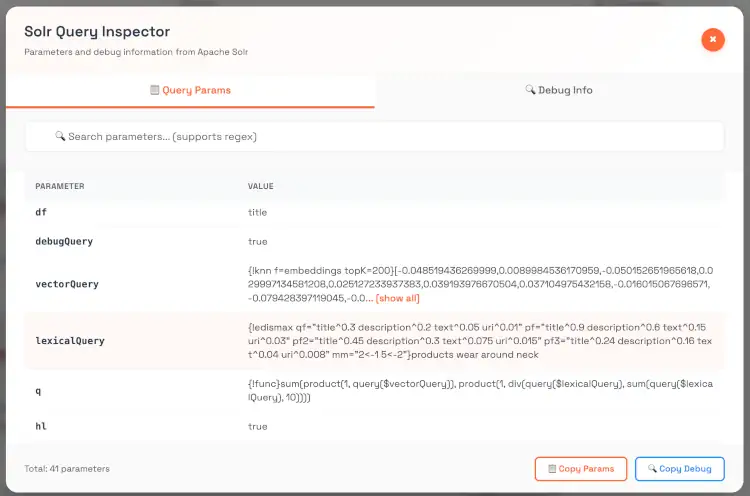
Query Inspector Solr DebugQuery

Full Crawl Stats & Search Stats for your Opensolr Web Crawler Index
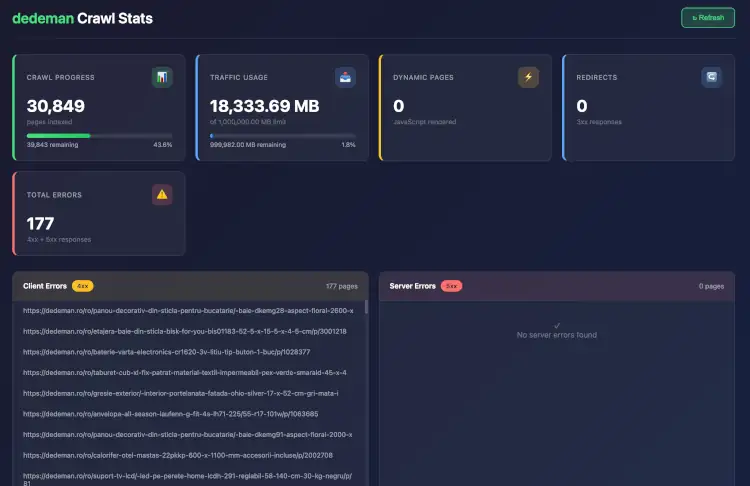
Crawl Stats Query Stats

You can play around with the Solr API

https://fi.solrcluster.com/solr/rueb/select?wt=json&indent=true&q=*:*&rows=2
https://chicago96.solrcluster.com/solr/peilishop/select?wt=json&indent=true&q=*:*&rows=2

For both, you can use:

  • Username: 123
  • Password: 123

You can also test your vector search engine directly here:

Try using conceptual queries (semantic rather than literal):

  • climate disasters hurricanes floods wildfires
  • space exploration mars colonization economy
  • ancient microbes life beyond earth

These queries will show how your embeddings and vector similarity work in practice.


3. Using the Solr API Directly

Solr Core Example:

https://de9.solrcluster.com/solr/vector/select?wt=json&indent=true&q=*:*&rows=2

Username: 123
Password: 123

3.1 Simple Lexical Query

curl -u 123:123 "https://de9.solrcluster.com/solr/vector/select?q=climate+change&rows=5&wt=json"

3.2 Pure Vector Query (KNN)

curl -u 123:123 "https://de9.solrcluster.com/solr/vector/select?q={!knn%20f=embeddings%20topK=50}[0.123,0.432,0.556,...]&wt=json"

Replace the vector array with your own embedding from the OpenSolr AI NLP API.

3.3 Hybrid Query (Lexical + Vector)

curl -u 123:123 "https://de9.solrcluster.com/solr/vector/select?q={!bool%20should=$lexicalQuery%20should=$vectorQuery}&lexicalQuery={!edismax%20qf=content}climate+change&vectorQuery={!knn%20f=embeddings%20topK=50}[0.12,0.43,0.66,...]&wt=json"

This version mixes traditional keyword scoring with semantic similarity — best of both worlds.


4. Getting Embeddings via OpenSolr API

You can generate embeddings for any text or document using these API endpoints:

Example:

function postEmbeddingRequest($email = "PLEASE_LOG_IN", $api_key = "PLEASE_LOG_IN", $core_name = "PLEASE_LOG_IN", $payload = "the payload text to create vector embeddings for") {

    $apiUrl = "https://api.opensolr.com/solr_manager/api/embed";

    // Build POST fields
    $postFields = http_build_query([
        'email' => $email,
        'api_key' => $api_key,
        'index_name' => $core_name,
        'payload' => is_array($payload) ? json_encode($payload) : $payload
    ]);

    $ch = curl_init($apiUrl);
    curl_setopt_array($ch, [
        CURLOPT_RETURNTRANSFER => true,
        CURLOPT_POST => true,
        CURLOPT_POSTFIELDS => $postFields,
        CURLOPT_HTTPHEADER => [
            'Content-Type: application/x-www-form-urlencoded'
        ],
        CURLOPT_TIMEOUT => 30,
        CURLOPT_CONNECTTIMEOUT => 10,
    ]);

    $response = curl_exec($ch);
    $httpCode = curl_getinfo($ch, CURLINFO_HTTP_CODE);
    $error = curl_error($ch);

    curl_close($ch);

    if ($error) {
        error_log("cURL error: $error");
    }

    if ($httpCode < 200 || $httpCode >= 300) {
        error_log("HTTP error: $httpCode - Response: " . ($response ?: 'No response'));
    }

    if (empty($response)) {
        error_log("Empty response from API.");
    }

    $json = json_decode($response, true);

    if (json_last_error() !== JSON_ERROR_NONE) {
        error_log("Failed to decode JSON response: " . json_last_error_msg());
    }

    return $json;
}

Response will include the vector embedding array you can pass to Solr.


5. Example Implementations

PHP Example

<?php
$url = 'https://de9.solrcluster.com/solr/vector/select?wt=json';
$query = '{!bool should=$lexicalQuery should=$vectorQuery}';
$params = [
  'lexicalQuery' => '{!edismax qf=content}climate disasters',
  'vectorQuery'  => '{!knn f=embeddings topK=50}[0.12,0.43,0.56,0.77]'
];

$ch = curl_init($url);
curl_setopt($ch, CURLOPT_USERPWD, '123:123');
curl_setopt($ch, CURLOPT_POSTFIELDS, http_build_query($params));
curl_setopt($ch, CURLOPT_RETURNTRANSFER, true);
$response = curl_exec($ch);
curl_close($ch);

echo $response;
?>

AJAX Example

<script>
fetch('https://de9.solrcluster.com/solr/vector/select?wt=json&q={!knn%20f=embeddings%20topK=10}[0.11,0.22,0.33]', {
  headers: {
    'Authorization': 'Basic ' + btoa('123:123')
  }
})
.then(r => r.json())
.then(console.log);
</script>

Python Example

import requests
from requests.auth import HTTPBasicAuth

url = "https://de9.solrcluster.com/solr/vector/select"
params = {
    'q': '{!bool should=$lexicalQuery should=$vectorQuery}',
    'lexicalQuery': '{!edismax qf=content}climate disasters',
    'vectorQuery': '{!knn f=embeddings topK=50}[0.12,0.43,0.56,0.77]',
    'wt': 'json'
}

response = requests.post(url, data=params, auth=HTTPBasicAuth('123', '123'))
print(response.json())

6. Notes

  • You can adjust topK to control how many similar results you want (usually 20–100).
  • If you use {!bool should=should} instead of must, the vector similarity will have more influence on ranking.
  • For best hybrid results, combine both lexical and vector queries.

7. Need Help?

To get started or request a ready-to-use search engine setup:
📧 support@opensolr.com

Read Full Answer

Hybrid Search in Opensolr: A Modern Approach

🚀 Hybrid Search in Apache Solr: Modern Power, Classic Roots

The Evolution of Search: From Keywords to Vectors 🔍➡️🧠

Important Pre-Req.

First make sure you have this embeddings field in your schema.xml (works with):

<!--VECTORS-->
<field name="embeddings" type="vector" indexed="true" stored="true" multiValued="false" required="false" />
<fieldType name="vector" class="solr.DenseVectorField" vectorDimension="1024" similarityFunction="cosine"/>

⚠️ Pay very close attention to the vectorDimension, as it has to match the embeddings that you are creating with your LLM Model. If using the Opensolr Index Embedding API, this has to be exactly: 1024. This works with the Opensolr Embed API Endpoint which uses the BAAI/bge-m3 embedding model.


Opensolr Also supports the native Solr /schema API, so you can also run these two, in order to add your fields to the schema.xml.

$ curl -u <INDEX_USERNAME>:<INDEX_PASSWORD> https://<OPENSOLR_INDEX_HOST>solr/<OPENSOLR_INDEX_NAME>/schema/fieldtypes -H 'Content-type:application/json' -d '{
  "add-field-type": {
    "name": "vector",
    "class": "solr.DenseVectorField",
    "vectorDimension": 1024,
    "similarityFunction": "cosine"
  }
}'

$ curl -u <INDEX_USERNAME>:<INDEX_PASSWORD> https://<OPENSOLR_INDEX_HOST>solr/<OPENSOLR_INDEX_NAME>/schema/fields -H 'Content-type:application/json' -d '{
  "add-field": {
    "name":"embeddings",
    "type":"vector",
    "indexed":true,
    "stored":false, // true if you want to see the vectors for debugging
    "multiValued":false,
    "required":false,
    "dimension":1024,  // adjust to your embedder size
    "similarityFunction":"cosine"
  }
}'

Seocond make sure you have this in solrconfig.xml for atomic updates to use with the Opensolr Index Embedding API:

<!-- The default high-performance update handler -->
<updateHandler class="solr.DirectUpdateHandler2">
      
        <updateLog>
          <int name="numVersionBuckets">65536</int>
          <int name="maxNumLogsToKeep">10</int>
          <int name="numRecordsToKeep">10</int>
        </updateLog>

.....

</updateHandler>

Why Vector Search Isn’t a Silver Bullet ⚠️

As much as we love innovation, vector search still has a few quirks:

  • Mystery Rankings: Why did document B leapfrog document A? Sometimes, it’s anyone’s guess. 🕳️
  • Chunky Business: Embedding models are picky eaters—they work best with just the right size of text chunks.
  • Keyword Nostalgia: Many users still expect the comfort of exact matches. “Where’s my keyword?” they ask. (Fair question!)

Hybrid Search: The Best of Both Worlds 🤝

Hybrid search bridges the gap—combining trusty keyword (lexical) search with smart vector (neural) search for results that are both sharp and relevant.

How It Works

  1. Double the Fun: Run a classic keyword query and a KNN vector search at the same time, creating two candidate lists.
  2. Clever Combining: Merge and rank for maximum “aha!” moments.

Apache Solr Does Hybrid Search (Despite the Rumors) 💡

Contrary to the grapevine, Solr can absolutely do hybrid search—even if the docs are a little shy about it. If your schema mixes traditional fields with a solr.DenseVectorField, you’re all set.


Candidate Selection: Boolean Query Parser to the Rescue 🦸‍♂️

Solr’s Boolean Query Parser lets you mix and match candidate sets with flair:

Union Example

q={!bool should=$lexicalQuery should=$vectorQuery}&
lexicalQuery={!type=edismax qf=text_field}term1&
vectorQuery={!knn f=vector topK=10}[0.001, -0.422, -0.284, ...]

Result: All unique hits from both searches. No duplicates, more to love! ❤️

Intersection Example

q={!bool must=$lexicalQuery must=$vectorQuery}&
lexicalQuery={!type=edismax qf=text_field}term1&
vectorQuery={!knn f=vector topK=10}[0.001, -0.422, -0.284, ...]

Result: Only the most relevant docs—where both worlds collide. 🤝


You also have to be mindful of the Solr version you are using, since we were able to make this work only on Solr version 9.0. Beware this did not work on Solr 9.6! Only reranking queries worked on Solr 9.6 (as shown below).

Basically, at this point, here are all the paramerers we sent Solr, to make this hybrid search working on Solr version 9.0:

Classic Solr Edismax Search combined with dense vector search (UNION)

{
  "mm":"1<100% 2<70% 3<45% 5<30% 7<20% 10<10%",
  "df":"title",
  "ps":"3",
  "bf":"recip(rord(timestamp),1,1500,500)^90",
  "fl":"score,meta_file_modification_date*,score,og_image,id,uri,description,title,meta_icon,content_type,creation_date,timestamp,meta_robots,content_type,meta_domain,meta_*,text",
  "start":"0",
  "fq":"+content_type:text*",
  "rows":"100",
  "vectorQuery":"{!knn f=embeddings topK=100}[-0.024160323664546,...,0.031963128596544]",
  "q":"{!bool must=$lexicalQuery must=$vectorQuery}",
  "qf":"title^10 description^5 uri^3 text^2 phonetic_title^0.1",
  "pf":"title^15 description^7 uri^9",
  "lexicalQuery":"{!edismax qf=$qf bf=$bf ps=$ps pf=$pf pf2=$pf2 pf3=$pf3 mm=$mm}trump tariffs",
  "pf3":"text^5",
  "pf2":"tdescription^6"
}

Solr 9.6 reranking query. (It also works in Solr 9.0):

{
  "mm":"1<100% 2<70% 3<45% 5<30% 7<20% 10<10%",
  "df":"title",
  "ps":"3",
  "bf":"recip(rord(timestamp),1,1500,500)^90",
  "fl":"score,meta_file_modification_date*,score,og_image,id,uri,description,title,meta_icon,content_type,creation_date,timestamp,meta_robots,content_type,meta_domain,meta_*,text",
  "start":"0",
  "fq":"+content_type:text*",
  "rows":"100",
  "q":"{!knn f=embeddings topK=100}[-0.024160323664546,...,0.031963128596544]",
  "rqq":"{!edismax qf=$qf bf=$bf ps=$ps pf=$pf pf2=$pf2 pf3=$pf3 mm=$mm}trump tariffs",
  "qf":"title^10 description^5 uri^3 text^2 phonetic_title^0.1",
  "pf":"title^15 description^7 uri^9",
  "pf3":"text^5",
  "pf2":"tdescription^6",
  "rq":"{!rerank reRankQuery=$rqq reRankDocs=100 reRankWeight=3}"
}

A few remarks:

🎹 This is based on the classic Opensolr Web Crawler Index, that does most of it's work within the fields: title, description, text, uri.

📰 Index is populated with data crawled from various public news websites.

🔗 We embedded a concatenation of title, description and the first 50 sentences of text.

💼 We use the Opensolr Query Embed API, to embed our query at search-time.

🏃🏻‍♂️ You can see this search in action, here.

👩🏻‍💻 You can also see the Solr data and make your own queries on it. This index' Solr API, is here.

🔐 Credentials are: Username: 123 / Password: 123 -> Enjoy! 🥳


Cheat Sheet

🤥 Below is a cheat-sheet, of the fields and how you're supposed to use them if you run knn queries. Solr is very picky about what goes with knn and what doesn't. For example, for the Union query, we were unable to use highlighting. But, if you follow the specs below, you'll probably won't be getting any Query can not be null Solr errors... (or will you? 🤭)


What Belongs Inside {!edismax} in lexicalQuery? 🧾

Parameter Inside lexicalQuery Why
q ✅ YES Required for the subquery to function
qf, pf, bf, bq, mm, ps ✅ YES All edismax features must go inside
defType ❌ NO Already defined by {!edismax}
hl, spellcheck, facet, rows, start, sort ❌ NO These are top-level Solr request features

💡 Hybrid Query Cheat Sheet

Here’s how to do it right when you want all the bells and whistles (highlighting, spellcheck, deep edismax):

# TOP-LEVEL BOOLEAN QUERY COMPOSING EDISMAX AND KNN
q={!bool should=$lexicalQuery should=$vectorQuery}

# LEXICAL QUERY: ALL YOUR EDISMAX STUFF GOES HERE
&lexicalQuery={!edismax q=$qtext qf=$qf pf=$pf mm=$mm bf=$bf}

# VECTOR QUERY
&vectorQuery={!knn f=vectorField topK=10}[0.123, -0.456, ...]

# EDISMAX PARAMS
&qtext='flying machine'
&qf=title^6 description^3 text^2 uri^4
&pf=text^10
&mm=1<100% 2<75% 3<50% 6<30%
&bf=recip(ms(NOW,publish_date),3.16e-11,1,1)

# NON-QUERY STUFF
&hl=true
&hl.fl=text
&hl.q=$lexicalQuery
&spellcheck=true
&spellcheck.q=$qtext
&rows=20
&start=0
&sort=score desc

In Summary

Hybrid search gives you the sharp accuracy of keywords and the deep smarts of vectors—all in one system. With Solr, you can have classic reliability and modern magic. 🍦✨

“Why choose between classic and cutting-edge, when you can have both? Double-scoop your search!”

Happy hybrid searching! 🥳

Read Full Answer

Opensolr AI Search

Opensolr AI Crawl & Search

Opensolr AI

Smarter Search. Zero Setup.

Our new AI-powered Web Crawler does the heavy lifting — it crawls your site, extracts structured data, applies NLP + NER, and feeds everything straight into Solr — fully indexed and ready to search.

No manual config. No fiddling with schemas. Just point it at your site and go.

Key Features

  • AI enrichment: people, places, language, sentiment
  • Instant embedding with a clean, responsive UI
  • Supports HTML, PDFs, docs, images — even metadata & GPS
  • Live stats, recrawling, and scheduling — all built-in

➡️ Learn More


Because if your site’s content is smart, your search should be too. 🧠

Read Full Answer

How to use OpenNLP (NER) with Opensolr

UPDATE Oct 29, 2024: OpenNLP + Opensolr Integration Guide

Heads up!
Before you dive into using NLP models with your Opensolr index, please contact us to request the NLP models to be installed for your Opensolr index.
We'll reply with the correct path to use for the .bin files in your schema.xml or solrconfig.xml. Or, if you'd rather avoid all the hassle, just ask us to set it up for you—done and done.


What’s this all about?

This is your step-by-step guide to using AI-powered OpenNLP models with Opensolr. In this walkthrough, we’ll cover Named Entity Recognition (NER) using default OpenNLP models, so you can start extracting valuable information (like people, places, and organizations) directly from your indexed data.

⚠️ Note:
Currently, these models are enabled by default only in the Germany, Solr Version 9 environment. So, if you want an easy life, create your index there!
We’re happy to set up the models in any region (or even your dedicated Opensolr infrastructure for corporate accounts) if you reach out via our Support Helpdesk.

Add New Opensolr Index

You can also download OpenNLP default models from us or the official OpenNLP website.


🛠️ Step-by-Step: Enable NLP Entity Extraction

  1. Create your Opensolr Index

    • Use this guide to create your Opensolr index (Solr 7, 8, or 9).
    • Pro Tip: Creating your index in the Germany Solr 9 Web Crawler Environment skips most of the manual steps below.
  2. Edit Your schema.xml

    • Go to the Opensolr Control Panel.
    • Click your Index Name → Configuration tab → select schema.xml to edit.
    Edit schema.xml
    • Add these snippets:

      Dynamic Field (for storing entities):

<dynamicField name="*_s" type="string" multiValued="true" indexed="true" stored="true" termVectors="true" termPositions="true" termOffsets="true" storeOffsetsWithPositions="true" />
  **NLP Tokenizer fieldType:**
<fieldType name="text_nlp" class="solr.TextField" positionIncrementGap="100">
    <analyzer>
        <charFilter class="solr.MappingCharFilterFactory" mapping="mapping-ISOLatin1Accent.txt"/>
        <tokenizer class="solr.OpenNLPTokenizerFactory"
            sentenceModel="en-sent.bin"
            tokenizerModel="en-token.bin"/>
         <filter class="solr.OpenNLPPOSFilterFactory" posTaggerModel="en-pos-maxent.bin"/>
         <filter class="solr.OpenNLPChunkerFilterFactory" chunkerModel="en-chunker.bin"/>
         <filter class="solr.TypeAsPayloadFilterFactory"/>
     </analyzer>
 </fieldType>
- **Important:** Don’t use the `text_nlp` type for your dynamic fields! It’s only for the update processor.
  1. Save, then Edit Your solrconfig.xml

    Save schema.xml
    • Add the following updateRequestProcessorChain (and corresponding requestHandler):
<requestHandler name="/update" class="solr.UpdateRequestHandler" >
    <lst name="defaults">
        <str name="update.chain">nlp</str>
    </lst>
</requestHandler>
<updateRequestProcessorChain name="nlp">
    <!-- Extract English People Names -->
    <processor class="solr.OpenNLPExtractNamedEntitiesUpdateProcessorFactory">
        <str name="modelFile">en-ner-person.bin</str>
        <str name="analyzerFieldType">text_nlp</str>
        <arr name="source">
            <str>title</str>
            <str>description</str>
        </arr>
        <str name="dest">people_s</str>
    </processor>
    <!-- Extract Spanish People Names -->
    <processor class="solr.OpenNLPExtractNamedEntitiesUpdateProcessorFactory">
        <str name="modelFile">es-ner-person.bin</str>
        <str name="analyzerFieldType">text_nlp</str>
        <arr name="source">
            <str>title</str>
            <str>description</str>
        </arr>
        <str name="dest">people_s</str>
    </processor>
    <!-- Extract Locations -->
    <processor class="solr.OpenNLPExtractNamedEntitiesUpdateProcessorFactory">
        <str name="modelFile">en-ner-location.bin</str>
        <str name="analyzerFieldType">text_nlp</str>
        <arr name="source">
            <str>title</str>
            <str>description</str>
        </arr>
        <str name="dest">location_s</str>
    </processor>
    <!-- Extract Organizations -->
    <processor class="solr.OpenNLPExtractNamedEntitiesUpdateProcessorFactory">
        <str name="modelFile">en-ner-organization.bin</str>
        <str name="analyzerFieldType">text_nlp</str>
        <arr name="source">
            <str>title</str>
            <str>description</str>
        </arr>
        <str name="dest">organization_s</str>
    </processor>
    <!-- Language Detection -->
    <processor class="org.apache.solr.update.processor.OpenNLPLangDetectUpdateProcessorFactory">
        <str name="langid.fl">title,text,description</str>
        <str name="langid.langField">language_s</str>
        <str name="langid.model">langdetect-183.bin</str>
    </processor>
    <!-- Remove duplicate extracted entities -->
    <processor class="solr.UniqFieldsUpdateProcessorFactory">
        <str name="fieldRegex">.*_s</str>
    </processor>
    <processor class="solr.RunUpdateProcessorFactory" />
</updateRequestProcessorChain>
  1. Populate Test Data (for the impatient!)

    • If you’re using the Germany Solr 9 Web Crawler, you can crawl your site and extract all the juicy entities automatically.
    • Or, insert a sample doc via Solr Admin:
    Solr Admin Panel Add Docs to Solr Index

    Sample JSON:

{
    "id": "1",
    "title": "Jack Sparrow was a pirate. Many feared him. He used to live in downtown Las Vegas.",
    "description": "Jack Sparrow and Janette Sparrowa, are now on their way to Monte Carlo for the summer vacation, after working hard for Microsoft, creating the new and exciting Windows 11 which everyone now loves. :)",
    "text": "The Apache OpenNLP project is developed by volunteers and is always looking for new contributors to work on all parts of the project. Every contribution is welcome and needed to make it better. A contribution can be anything from a small documentation typo fix to a new component.Learn more about how you can get involved."
}
  1. See the Magic!

    • Visit the query tab to see extracted entities in action!
    Solr Query Opensolr NLP End Result

Need a hand?

If any step trips you up, contact us and we'll gladly assist you—whether it's model enablement, schema help, or just a friendly chat about Solr and AI. 🤝


Happy Solr-ing & entity extracting!

Read Full Answer

Using NLP Models

🧠 Using NLP Models in Your Solr schema_extra_types.xml

Leverage the power of Natural Language Processing (NLP) right inside Solr!
With built-in support for OpenNLP models, you can add advanced tokenization, part-of-speech tagging, named entity recognition, and much more—no PhD required.


🚀 Why Use NLP Models in Solr?

Integrating NLP in your schema allows you to:

  • Extract nouns, verbs, or any part-of-speech you fancy.
  • Perform more relevant searches by filtering, stemming, and synonymizing.
  • Create blazing-fast autocomplete and suggestion features via EdgeNGrams.
  • Support multi-language, linguistically smart queries.

In short: your Solr becomes smarter and your users get better search results.


⚙️ Example: Dutch Edge NGram Nouns Field

Here’s a typical fieldType in your schema_extra_types.xml using OpenNLP:

<fieldType name="text_edge_nouns_nl" class="solr.TextField" positionIncrementGap="100">
  <analyzer type="index">
    <tokenizer class="solr.OpenNLPTokenizerFactory" sentenceModel="/opt/nlp/nl-sent.bin" tokenizerModel="/opt/nlp/nl-token.bin"/>
    <filter class="solr.OpenNLPPOSFilterFactory" posTaggerModel="/opt/nlp/nl-pos-maxent.bin"/>
    <filter class="solr.TypeTokenFilterFactory" types="pos_edge_nouns_nl.txt" useWhitelist="true"/>
    <filter class="solr.LowerCaseFilterFactory"/>
    <filter class="solr.RemoveDuplicatesTokenFilterFactory"/>
    <filter class="solr.EdgeNGramFilterFactory" minGramSize="2" maxGramSize="25"/>
  </analyzer>
  <analyzer type="query">
    <tokenizer class="solr.OpenNLPTokenizerFactory" sentenceModel="/opt/nlp/nl-sent.bin" tokenizerModel="/opt/nlp/nl-token.bin"/>
    <filter class="solr.OpenNLPPOSFilterFactory" posTaggerModel="/opt/nlp/nl-pos-maxent.bin"/>
    <filter class="solr.TypeTokenFilterFactory" types="pos_edge_nouns_nl.txt" useWhitelist="true"/>
    <filter class="solr.LowerCaseFilterFactory"/>
    <filter class="solr.SynonymGraphFilterFactory" synonyms="synonyms_edge_nouns_nl.txt"/>
    <filter class="solr.RemoveDuplicatesTokenFilterFactory"/>
  </analyzer>
</fieldType>

🔎 Important Details

  • Model Paths:
    Always reference the full absolute path for NLP model files. For example:

    sentenceModel="/opt/nlp/nl-sent.bin"
    tokenizerModel="/opt/nlp/nl-token.bin"
    posTaggerModel="/opt/nlp/nl-pos-maxent.bin"
    

    This ensures Solr always finds your precious language models—no “file not found” drama!

  • Type Token Filtering:
    The TypeTokenFilterFactory with useWhitelist="true" will only keep tokens matching the allowed parts of speech (like nouns, verbs, etc.), as defined in pos_edge_nouns_nl.txt. This keeps your index tight and focused.

  • Synonym Graphs:
    Add SynonymGraphFilterFactory to enable query-side expansion. This is great for handling multiple word forms, synonyms, and local lingo.


🧑‍🔬 Best Practices & Gotchas

  • Keep your NLP model files up to date and tested for your language version!
  • If using multiple languages, make sure you have the right models for each language. (No, Dutch models won’t help with Klingon. Yet.)
  • EdgeNGram and NGram fields are fantastic for autocomplete—but don’t overdo it, as they can bloat your index if not tuned.
  • Use RemoveDuplicatesTokenFilterFactory to keep things clean and efficient.

🌍 Not Just for Dutch!

You can set up similar analyzers for English, undefined language, or anything you like. For example:

<fieldType name="text_nouns_en" class="solr.TextField" positionIncrementGap="100">
  <analyzer type="index">
    <tokenizer class="solr.OpenNLPTokenizerFactory" sentenceModel="/opt/nlp/en-sent.bin" tokenizerModel="/opt/nlp/en-token.bin"/>
    <filter class="solr.OpenNLPPOSFilterFactory" posTaggerModel="/opt/nlp/en-pos-maxent.bin"/>
    <filter class="solr.TypeTokenFilterFactory" types="pos_nouns_en.txt" useWhitelist="true"/>
    <filter class="solr.LowerCaseFilterFactory"/>
    <filter class="solr.RemoveDuplicatesTokenFilterFactory"/>
  </analyzer>
  <analyzer type="query">
    <tokenizer class="solr.OpenNLPTokenizerFactory" sentenceModel="/opt/nlp/en-sent.bin" tokenizerModel="/opt/nlp/en-token.bin"/>
    <filter class="solr.OpenNLPPOSFilterFactory" posTaggerModel="/opt/nlp/en-pos-maxent.bin"/>
    <filter class="solr.TypeTokenFilterFactory" types="pos_nouns_en.txt" useWhitelist="true"/>
    <filter class="solr.LowerCaseFilterFactory"/>
    <filter class="solr.SynonymGraphFilterFactory" synonyms="synonyms_nouns_en.txt"/>
    <filter class="solr.RemoveDuplicatesTokenFilterFactory"/>
  </analyzer>
</fieldType>

📦 Keep It Organized

  • Store all model files in a single, logical directory (like /opt/nlp/), and keep a README so you know what’s what.
  • Protect those models! They’re your “brains” for language tasks.

🛠️ Wrap-up

Using NLP models in your Solr analyzers will supercharge your search, make autocomplete smarter, and help users find what they’re actually looking for (even if they type like my cat walks on a keyboard).

Need more examples?
Check out the Solr Reference Guide - OpenNLP Integration or Opensolr documentation.


Happy indexing, and may your tokens always be well-typed! 😸🤓

Read Full Answer