Enterprise Site Search

Opensolr Enterprise Site Search — find answers to your questions

Opensolr Web Crawler — Site Search Solution & Platform Gui...

Complete Guide

Opensolr Web Crawler — Site Search Solution

From zero to a live AI-powered search engine in minutes. No DevOps. No ML expertise. Just a few clicks.

New — Drupal Module

Opensolr Search for Drupal

Drop-in AI-powered search for Drupal 10 & 11. Uses the Web Crawler you’re reading about and a real-time Data Ingestion API — both working together in one module. Hybrid vector + keyword search, faceted navigation, autocomplete, analytics dashboard. Zero code required.

Drupal Search Docs →
Hybrid AI + keyword search
Real-time content sync
Facets, autocomplete, analytics
Crawler + Ingestion combined

What is Opensolr?

Opensolr is a managed Apache Solr Cloud hosting platform — the infrastructure, the configuration, the monitoring, the backups, and the scaling, all handled for you. You get a fully operational Solr index in under a minute, with a comprehensive management UI that covers everything from field configuration to query debugging.

⚙️ Advanced Config UI

Schema editor, query debugger, synonyms, stopwords, field boosts — all in the browser. No SSH needed.
Learn more →

📊 Error Audit & Analytics

7-day searchable error log with smart fix suggestions, weekly digests, and query-level analytics.
Learn more →

💾 Backup & Restore

One-click snapshot backups of your Opensolr index. Restore to any previous state instantly.
Learn more →

🌐 Resilient Cluster

Need high availability? Opensolr Resilient Cluster adds master+replica replication with automatic failover.
Learn more →

🔒 Security & Auth

IP whitelisting, per-index passwords, CORS management, and 2FA for your account.
Learn more →

📡 Full API Access

Direct Solr API access, plus the Opensolr REST API for index management, commits, stats, and more.
Learn more →

On top of all that: the Web Crawler

The Opensolr Web Crawler transforms any Solr index into a complete Algolia / Elasticsearch alternative — with dense vector search (BGE-m3, 1024-dim), automatic AI summarization (LLM/RAG), an embeddable search UI, query elevation, click analytics, and no-results detection — all built in, all automatic, zero integration work. Point it at your website and it does the rest.

Get Started — Step by Step
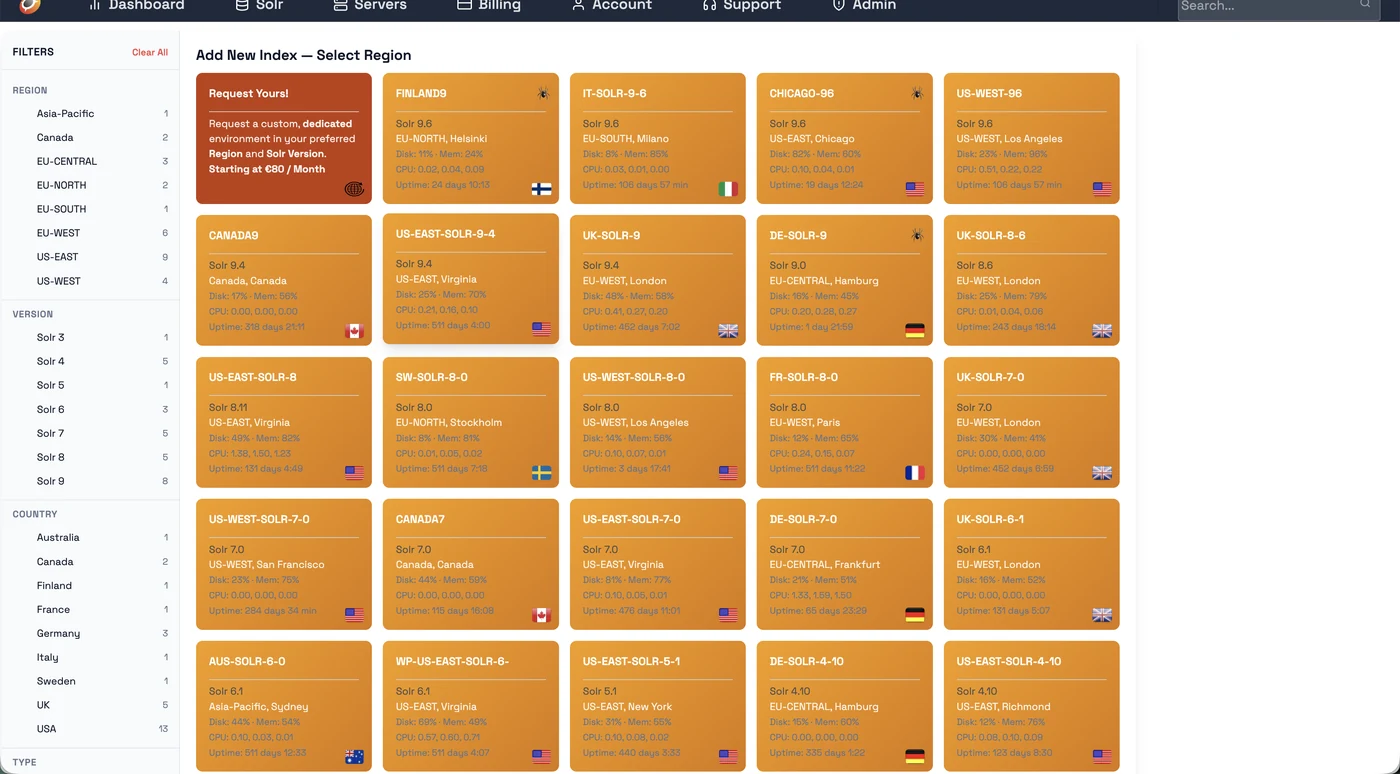
Choose a crawler-enabled Solr server
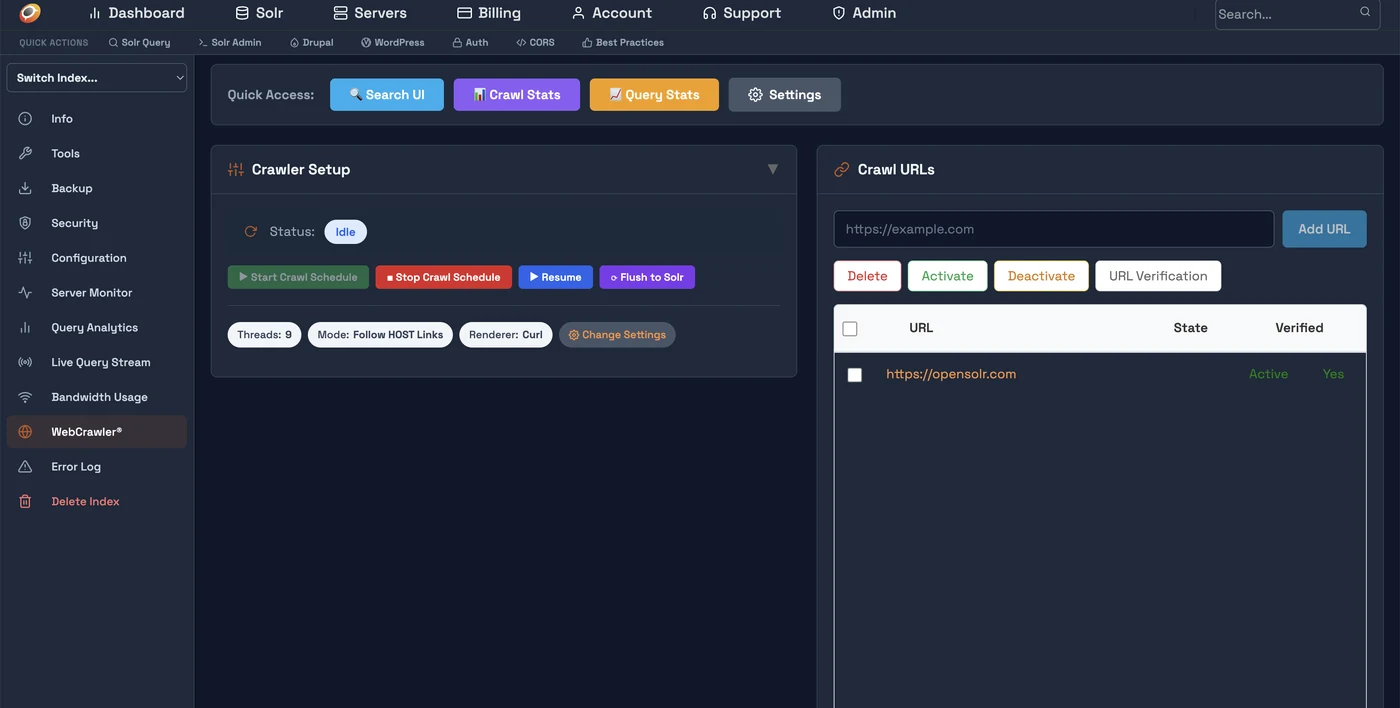
Crawler control panel — add URLs and start crawl
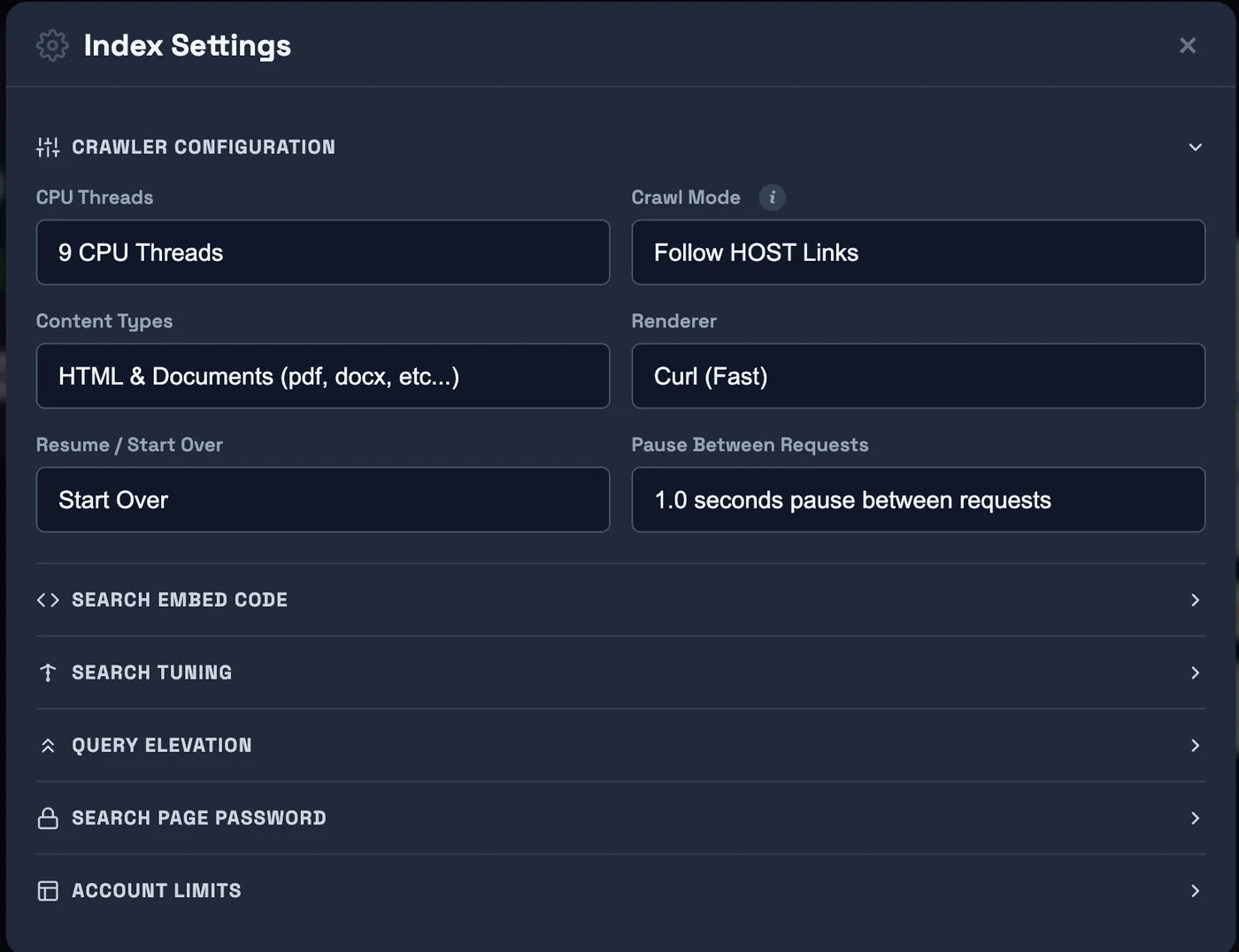
Index Settings — Crawler Configuration
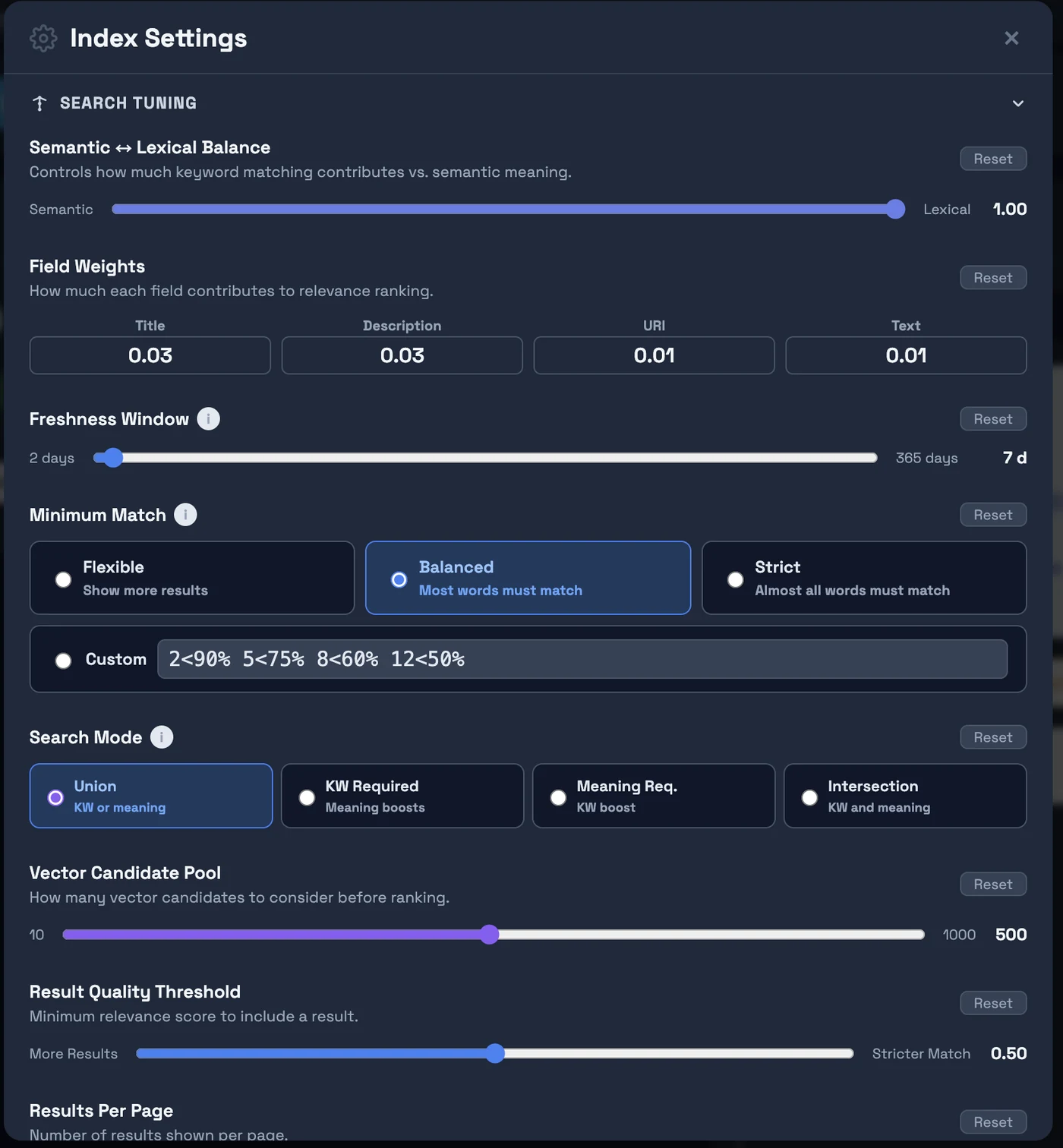
Search Tuning — adjust relevancy, freshness, blend mode
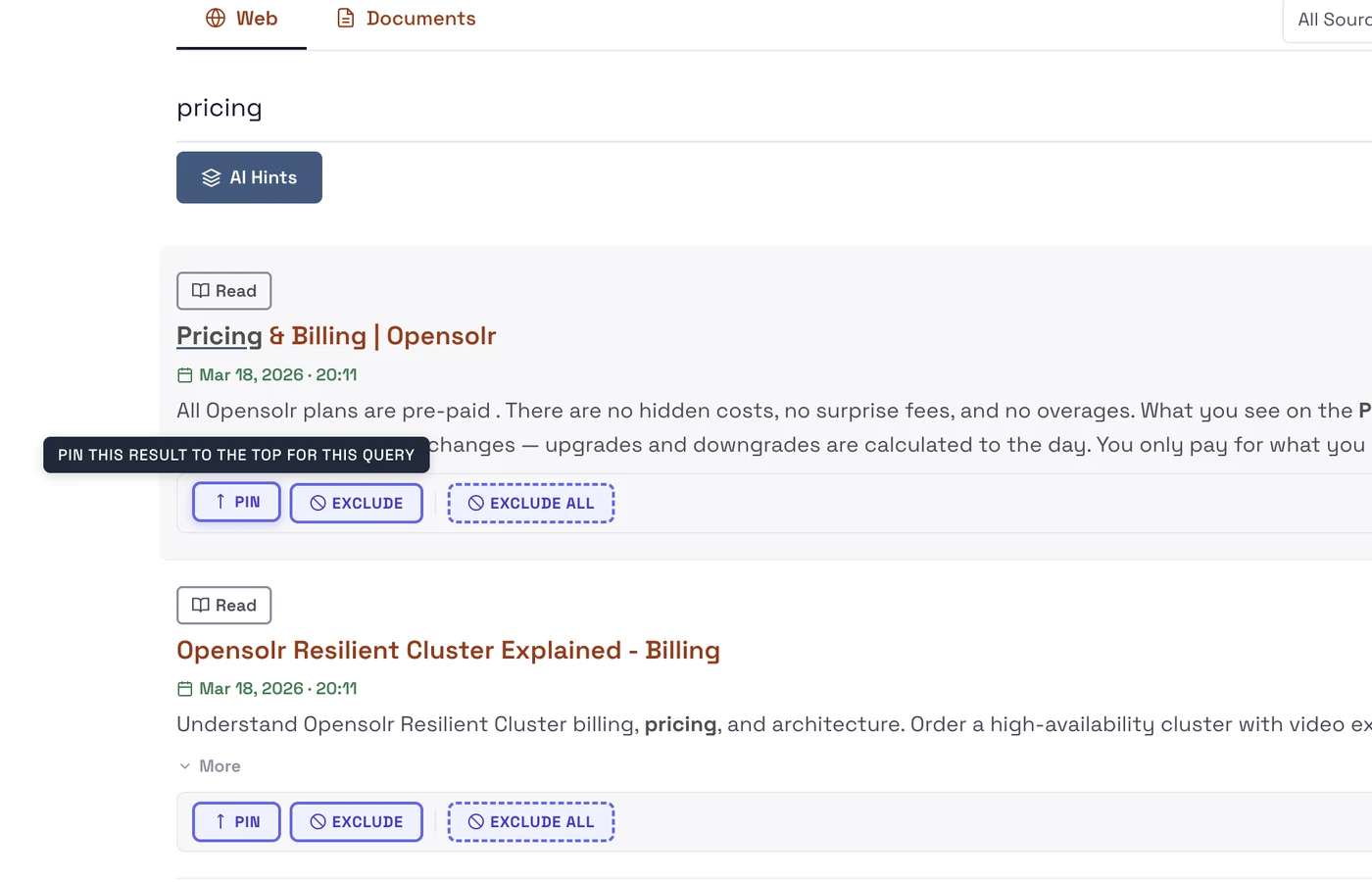
Live search with Query Elevation and AI Hints
1 / 5
1
Register & Login

Create a free account on opensolr.com. No credit card required to start.

2
Add New Index — choose a crawler-enabled server

Go to Solr → Add New Index. On the left sidebar, filter by Crawler = YES to show only servers with the web crawler. Pick your region.
⚠️ Important: Name your index with the suffix __dense (two underscores + "dense") — e.g. mysite__dense. Only indexes with this suffix get 1024-dim BGE-m3 vector embeddings enabled.

Need a crawler server in your region?

We deploy dedicated web crawler servers wherever you need them. Choose from available regions when creating your index, or contact us to get a dedicated crawler server deployed in your own region for optimal crawl speed and latency.

3
Open your index → WebCrawler tab

Click on the index name to open the Index Control Panel. In the left sidebar, click WebCrawler. You'll see the Crawler Setup panel and the Crawl URLs panel.

4
Add URL + Verify Ownership

Click Add URL and enter your sitemap (https://example.com/sitemap.xml) or homepage URL. Then click URL Verification — upload the provided verification file to /opensolr-verification/YOUR_CODE.txt on your web server. Verification runs automatically every 5 minutes.

5
Configure Settings (optional but recommended)

Click Change Settings to set crawl mode, threads, renderer, and content types. Expand Search Tuning to configure freshness, minimum match, and semantic/keyword balance. Use Keep Index Fresh to schedule automatic re-crawling of all indexed pages — keeps content and prices up to date, and removes dead pages from your index.

6
Click Start Crawl Schedule — you're done

The crawler runs on a schedule in the background. Pages are fetched, extracted, embedded (BGE-m3 vectors + sentiment + language auto-detection), and indexed automatically. Your live search is at: https://search.opensolr.com/YOUR_INDEX_NAME

What You Get Out of the Box

🔍 Hybrid Vector Search

BGE-m3 1024-dim embeddings + BM25, automatically combined. Finds semantically relevant results even when query words don't appear in the document.
Learn more →

🤖 AI Hints (LLM/RAG)

LLM-generated answers from your indexed content, streamed in real time. Powered by GPU-accelerated inference on every crawler-enabled server.
Learn more →

📌 Query Elevation

Pin specific results to the top for a query, or exclude pages you don't want surfaced. Full editorial control over your search results.
Learn more →

📈 Query Analytics

See what users search for, which queries return no results, click-through rates per result, and search volume trends — all in your dashboard.
Learn more →

🕷️ Crawl Stats

See pages crawled, errors, HTTP status codes, skipped URLs, and crawl queue depth — live. Identify content gaps and broken pages immediately.
Learn more →

🔄 Keep Index Fresh

Schedule automatic re-crawling of all previously indexed pages every 7–365 days. Content, prices, and metadata stay up to date. Pages that return 404 or 500 are automatically removed from your search index.

🎛️ Embeddable Search UI

One script tag adds the full search UI to any website — WordPress, Shopify, static HTML. Dark/light themes, mobile-first, autocomplete included.
Learn more →

🎯 Automatic SEO Meta Tags

When used with the Opensolr Search Drupal module, every page automatically gets canonical URLs, Open Graph tags, Twitter Cards, meta descriptions, JSON-LD structured data (Article & Product schemas), and an auto-generated XML sitemap. Built for the crawler — but Google loves it just as much.

Ready to build your search engine?

Free trial — no credit card required. Live in minutes.

Read Full Answer

Opensolr Web Crawler Standards

Web Crawler

Opensolr Web Crawler Standards

The same web standards that Google expects from your site apply here. If your pages are well-built for Googlebot, they are well-built for the Opensolr Web Crawler.

The Opensolr Web Crawler follows the same rules and conventions as major search engines. It respects robots.txt, honors meta robots directives, requires valid titles, and rewards well-structured metadata. The standards below are not Opensolr-specific — they are universal web standards. A site that follows them will perform well in Google, Bing, and Opensolr alike.

How the Crawler Evaluates a Page

Every URL goes through a multi-step evaluation pipeline before it enters your search index. This is the same general process Googlebot follows — and failing any step means the page is skipped.

Fetch

Request the URL. Must respond within 5 seconds.

robots.txt

Check if the URL is allowed by robots.txt rules.

Meta Tags

Check for noindex, nofollow, or none directives.

URL Check

Skip dynamic URLs with query strings by default.

Content

Extract title, text, metadata. Title is required.

Index

AI enrichment, embeddings, and Solr indexing.

Performance & Accessibility

5-Second Response Timeout

The page must begin responding within 5 seconds. This is the server response time (Time to First Byte), not the full page download. Pages that time out are skipped entirely.

Why it matters: Google recommends a TTFB under 200ms and will deprioritize slow pages. If your site takes more than 5 seconds to even start responding, it has a serious infrastructure problem that affects all crawlers — not just ours.

HTTP Status Codes

The crawler only indexes pages that return 200 OK. Pages returning 403, 404, 500, or any other error status are recorded but not indexed. Redirects (301/302) are followed, but if a redirect leaves the crawl domain, the page is skipped.

URL Standards

Dynamic URLs Are Not Indexed

Pages with a ? query string in the URL are followed (the crawler will visit them to discover more links) but are not indexed. This prevents duplicate content from URL parameters like session IDs, tracking codes, sort orders, and pagination tokens — the same reason Google recommends using rel="canonical" on parameterized URLs.

Indexed

https://example.com/products/shoes

https://example.com/blog/my-article

https://example.com/about

Clean, path-based URLs with no query strings.

Not Indexed

https://example.com/search?q=shoes

https://example.com/products?sort=price

https://example.com/page?id=42&ref=home

URLs with ? query parameters are skipped.

Robots Directives

The Opensolr Web Crawler respects the same robots directives as Google. If you block a page from Googlebot, it will also be blocked from the Opensolr crawler.

robots.txt

Pages that are disallowed in your site's /robots.txt file will not be crawled or indexed. The crawler checks robots.txt before requesting any URL, just like Googlebot does.

If you want certain sections of your site excluded from search results, robots.txt is the standard way to do it — and it works identically here.

Meta Robots Tags

noindex

Pages with <meta name="robots" content="noindex"> are crawled (to discover links) but not added to the search index. This is identical to how Google handles noindex — the page exists on your server but will never appear in search results.

nofollow

Pages with <meta name="robots" content="nofollow"> are indexed normally, but the crawler will not follow any outgoing links on that page. Use this on pages where you don't want the crawler discovering linked content (e.g., user-generated content with untrusted links).

none

Equivalent to noindex, nofollow combined. The page is neither indexed nor followed. This is the strictest directive — the page is effectively invisible to search.

Page Will Be Indexed

No robots meta tag at all (default: index, follow)

<meta name="robots" content="index, follow">

<meta name="robots" content="index">

Page Will NOT Be Indexed

<meta name="robots" content="noindex">

<meta name="robots" content="noindex, follow">

<meta name="robots" content="none">

Content Quality Requirements

Page Title Required

Every page must have a title — either via <title> or <meta property="og:title">. Pages without any title are skipped entirely. This is a hard requirement, not a suggestion.

Titles should also be unique across the site whenever possible. Duplicate titles make it harder for users to distinguish between results. Google flags duplicate titles as an issue in Search Console — it is equally problematic for site search.

Creation / Publication Date Recommended

Pages should include a publication or modification date via one of these meta tags:

<meta property="article:published_time" content="2026-03-15T10:00:00Z">
<meta property="og:updated_time" content="2026-03-15T10:00:00Z">

Why it matters: Without a date, the crawler cannot determine content freshness. Opensolr's Search Tuning includes a freshness boost that prioritizes newer content — but it only works when pages have dates. This applies to articles, blog posts, product pages, and any content where recency matters.

Author Best Practice

Include an author tag via <meta name="author">, <meta property="og:author">, or <meta property="article:creator">. Even a generic value like "Admin" or "Editorial Team" is better than nothing — it provides structured data that can be used for filtering and faceting in the future.

Category Best Practice

A <meta property="og:category"> or <meta property="article:section"> tag helps with faceted search — allowing users to filter results by topic. Google uses similar signals to understand content classification.

Duplicate Content & Canonical URLs

When two or more URLs serve the same content, they should declare a canonical URL:

<link rel="canonical" href="https://example.com/the-real-page">

Without a canonical tag, the crawler indexes every URL it finds. If the same content exists at /products/shoes and /catalog/shoes, both will appear in search results — creating duplicates that confuse users and dilute relevance.

This is identical to how Google handles canonicalization. If you have already set canonical tags for Google, they will work for the Opensolr Web Crawler automatically.

Correct

Both /products/shoes and /catalog/shoes include:

<link rel="canonical" href="/products/shoes">

Result: Only /products/shoes appears in search results.

Problem

Neither page has a canonical tag.

Result: Both appear in search — duplicate results for the same content.

Quick Reference

StandardStatusWhat Happens
Response time > 5 secondsRequiredPage is skipped — not crawled at all
URL has ? query stringRequiredPage is visited for link discovery but not indexed
Blocked in robots.txtRequiredPage is not crawled or indexed
Meta noindexRequiredPage is crawled for links but not indexed
Meta nofollowRequiredPage is indexed but outgoing links are not followed
Meta noneRequiredPage is neither indexed nor followed
No page titleRequiredPage is skipped entirely
Unique titles across siteRecommendedPrevents confusing duplicate results
Publication date meta tagRecommendedEnables freshness boost in search ranking
Author meta tagBest PracticeBetter data structure for future faceting
Category meta tagBest PracticeEnables topic-based filtering in results
Canonical URL tagRecommendedPrevents duplicate content in search index

Ready to Add Search to Your Site?

The Opensolr Web Crawler indexes your entire site — HTML, PDF, DOCX — with AI enrichment, vector embeddings, and hybrid search built in.

Read Full Answer